
Seamlessly track time for Azure DevOps items thanks to the native Lucen Track + Azure DevOps integration, and the Lucen Track Browser Widget for Chrome, and Microsoft Edge.
-
the Native integration will let you connect Lucen Track to your Azure DevOps account, to import projects and tasks;
-
The Lucen Track Browser widget lets you track time from the tools you are already using and in any other place, wherever you are on the web.
What you need to track time inside Azure DevOps:
-
The Lucen Track Browser Widget
-
Your Lucen Track Account
-
Your Azure DevOps account.
Connect Azure DevOps and Lucen Track
Step 1)
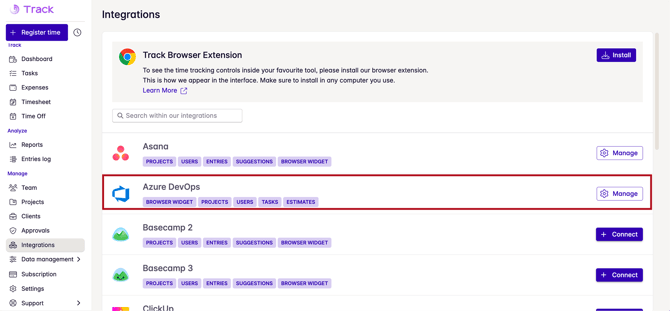
If you're the owner of the workspace, go to the Lucen Track app go to Integrations> Azure DevOps.
Step 2)
Connect Lucen Track to Azure DevOps by clicking the Link button.
Authorize the integration, and you'll be good to go!
Step 3)
Once connected, you'll be able to import your Azure DevOp projects inside Lucen Track. You can select the project manually...
Similarly, you can set up an automatic sync to connect your items (tasks) and users.
At this point, you and your team will have everything you need to track time for your Azure DevoOps projects inside Lucen Track.
The Timeneye Browser widget
Download and install the Lucen Track Browser Widget on your browser. Once installed, you'll see a small Timeneye icon on your Browser: that's the Widget, ready to be used.
Before proceeding further, we highly recommend pinning the Lucen Track widget to your browser extensions.
Go to your Azure DevOps account and log in through the Lucen Track Browser Widget.
If this procedure is successful, you will see time tracking controls appearing next to each task. Sometimes it can be necessary to refresh the page.
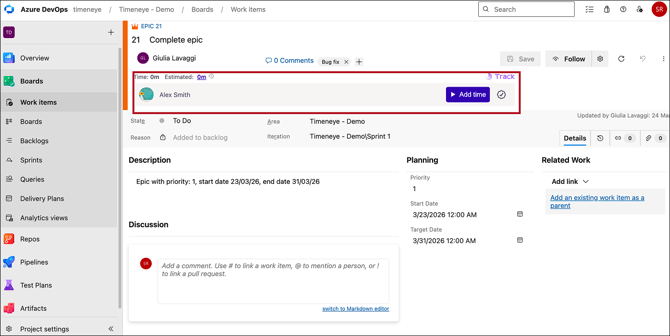
Click the Lucen Track button to open the Register Time dialog and start tracking time on your tasks!
How to track Time for your Azure DevOps Tasks
If you want to track inside Lucen Track
Locate the Tasks section in Lucen Track. Inside the Tasks section, you can look for your projects/tasks from Azure DevOps:
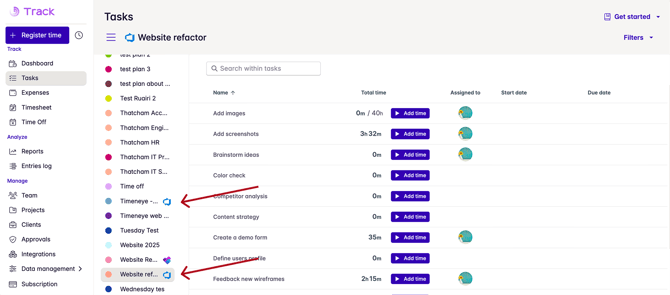
Click the add time button to track time.
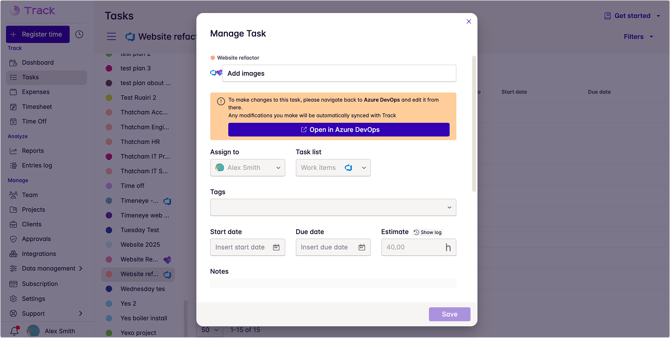
Note: thanks to our integration, the Effort field in be imported as Estimated time in Lucen Track:
If you use the Browser widget
Navigate to your Azure DevOps account and locate the tasks you are currently working on. Once you have successfully installed the Lucen Track Widget in your Browser, a convenient button will appear next to your tasks. Simply click on this button to open the Register Time dialog and effortlessly track your time.
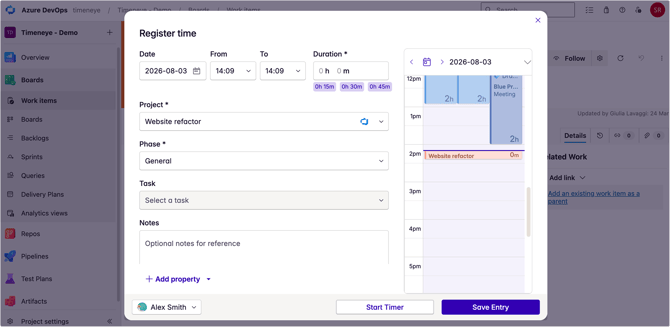
You have the option to manually enter the time you have spent or start a timer that will accurately track your time while you work. Once you are done, just save it.
All the time tracking will be safely stored in Lucen Track, for analysis, monitoring, and reporting purposes.
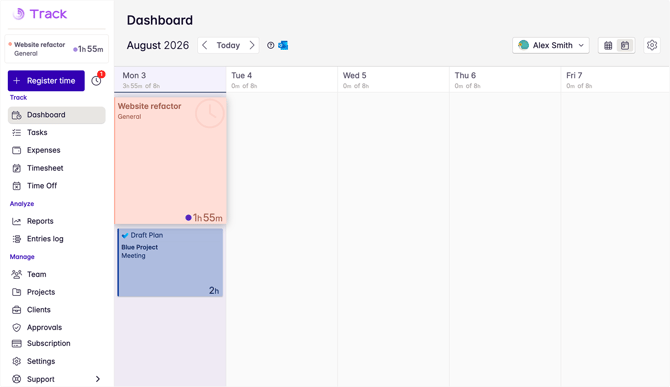
Once you start the timer, a time entry will be automatically created in your Lucen Track Dashboard.
Any changes you make in Lucen Track will be instantly reflected in Azure DevOps, always ensuring seamless synchronization between the two platforms.
You can find the Lucen Track time tracking controls in Boards, Backlog, and Sprints, allowing you to track and manage progress effectively.
When you go back into the Lucen Track dashboard, you'll be able to locate the time tracked with the integration easily: the time cards will show the tasks' names, as well as the Azure DevOps logo.
The Task section in Lucen Track
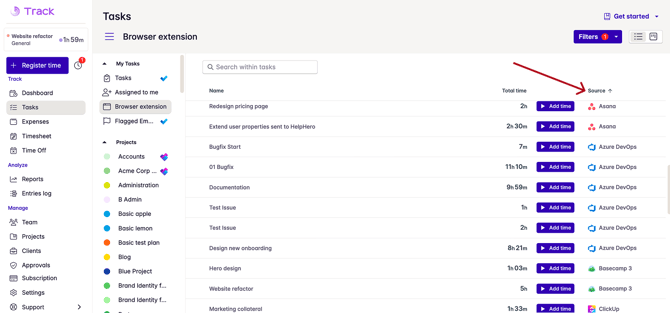
For a comprehensive view of all your tasks, make your way to our brand-new Tasks section.
Access the Browser Extension segment to view all the tasks that you have been tracking time on using the browser widget, including the Azure DevOps tasks.
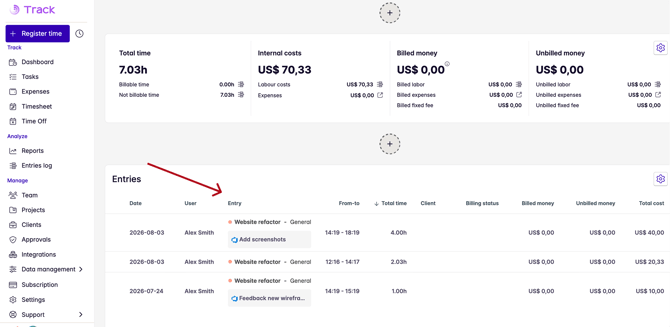
All the time tracked in both platforms is stored in Lucen Track, and available for productivity reports, project estimation, and payroll purposes.
Lastly, when generating a report, you have the option to add a widget that provides a comprehensive overview of your tasks. This widget allows you to easily identify the team members involved, the duration of their work, and the financial value tied to each task.
To see the integration in action, check out this tutorial: